Grading
This page covers grade submission, grading systems and curves, grade changes, incomplete grades, and independent study grading. For questions, contact [email protected].
1. Submitting Grades
Submit all grades via SSOL's Web Grading System. Faculty may assign TAs or administrative staff to enter grades as proxies, but each professor must make the final submission. Once approved, grades are posted overnight for students to view.
If you encounter login or access issues:
- Use Manage my UNI to resolve UNI-related issues.
- Contact CUIT at (212) 854-1919.
- View the complete Columbia University Guide to Web Grading.
2. Grading System
Your class roster may include both CBS students and non-CBS cross-registrants. Both grading systems apply depending on the student's home school.
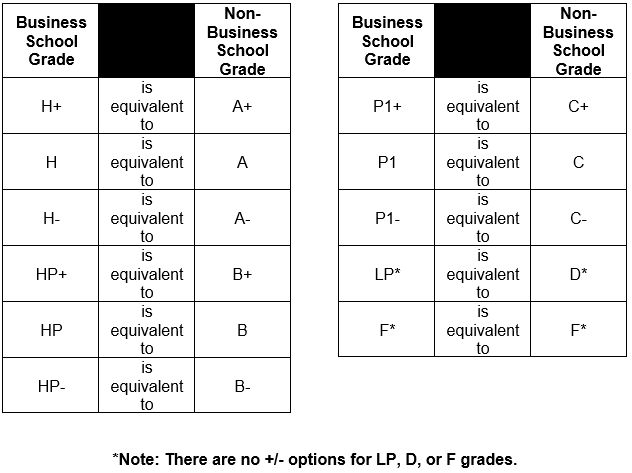
3. Grading Curves (MBA/EMBA Only)
Core Courses (EMBA B5000-B5999 / MBA B6000-B6999)
- H: 25-30%
- HP: 55-65%
- P1 or below (LP, F): 10-15%
+/- grades may be applied with the following restrictions:
- No H+ grades may be given in core courses.
- The number of pluses (+) must be equal to or less than the number of minuses (-) across all grades in the course.
Do not post core course grades in Canvas. Grades will not be released to students until the curve requirement is met.
Elective Courses (EMBA B7000-B7999 / MBA B8000-B8999)
- H+ and A+: No more than 2%*
- H+/H/H- and A+/A/A-: 50% or less
- P/LP/F and C/D: 5% or more (recommended)
+/- grades may be applied without restriction.
*For courses with fewer than 50 students, no more than one H+ or A+ grade may be assigned.
Courses that do not adhere to the required guidelines will not be accepted. For resources on increasing grading consistency, visit the Samberg Teaching Resources page.
MS and PhD Courses
Curves do not apply to courses numbered 9000-9999 or sections numbered 060-062.
MS Courses (B8000-B8999)
- H+ and A+: No more than 2%*
- H+/H/H- and A+/A/A-: 50% or less
- P/LP/F and C/D: 5% or more (recommended)
+/- grades may be applied without restriction.
*For courses with fewer than 50 students, no more than one H+ or A+ grade may be assigned.
MS/PhD Courses (B9000-B9999)
No grading curve requirement.
4. Grade Changes
Instructors are responsible for initiating grade changes via SSOL. Click Change Grades from the Web Grading menu.
5. Write-In Grades
If a student does not appear on your grade roster, use the Write-In section of the Grade Roster to enter their name, credentials, and grade. This is maintained as an electronic record for the instructor, department, and Registrar.
Note: Write-in grades do not automatically feed onto the student's transcript — they must be manually entered by the Registrar once the student is registered. Exchange students not on your roster should not be included in your grade distribution. The grading scheme for non-CBS students is A/B/C/D/F.
6. Incomplete Grades (MBA Students)
In cases of incapacitating illness, serious family emergency, or circumstances of comparable gravity, instructors may grant an Incomplete (IN) grade. The instructor and student must agree on a completion date. The incomplete must be resolved by the degree conferral date or six months from the date the incomplete was earned, whichever is earlier. If a final grade is not submitted by this date, the IN reverts to F.
MBA students must apply for an incomplete through the Office of Student Affairs before an incomplete can be granted.
7. Grade Suppression for Missing Course Evaluations
Students who do not complete end-of-course feedback will have their grade withheld until one week after the grading deadline. The feedback window typically lasts 5 days beginning on the day of the final class session. Once closed, forms will not be reopened for individual students.
The Samberg Institute oversees the course evaluation process.
8. Independent Study Grading
Independent study courses use the same grading scale as electives, with two exceptions: the course is not subject to a curve, and H+ is not permitted for MBA or EMBA independent study courses.
- With an assigned section: Submit grades via SSOL.
- Without an assigned section: Email grades directly to [email protected].
For full details on supervising independent studies — including initiation, approval, faculty credit limits, and deliverables — see the Independent Study Guidelines page.